

Track activity and notifications
Find your way back to recent work and catch everything addressed to you.
Review your activity stream
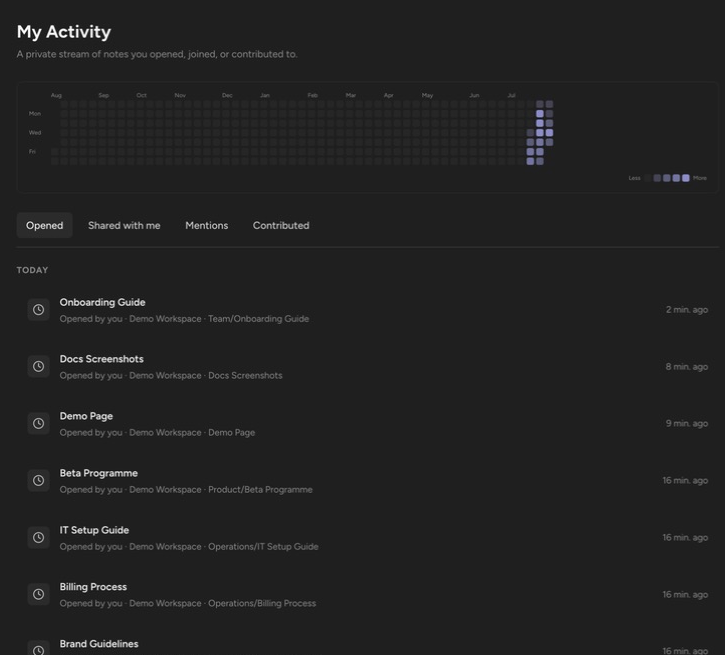
Section titled “Review your activity stream”Open My Activity from the workspace sidebar. It is “A private stream of notes you opened, joined, or contributed to” — only you see it. Four tabs split the stream:
| Tab | What it lists |
|---|---|
| Opened | Notes you opened. |
| Shared with me | Notes shared directly with you. |
| Mentions | Replies and @mentions that need your attention. |
| Contributed | Your edits, comments, and shares. |
An activity heatmap sits above the tabs. Click a day to filter the stream to that day; Clear day filter removes it. Click any entry to open the note.
Check in-app notifications
Section titled “Check in-app notifications”The Notifications bell collects replies and mentions — “You’ll see replies and mentions here.” Each entry names the actor and the event (“{actor} replied to a comment”, “{actor} mentioned you in a comment”, “{actor} mentioned you”) and carries an Open note action that jumps straight to the note. Clear the badge with Mark all read.
Get notified by email
Section titled “Get notified by email”Mentions also send email. When someone @-mentions you in a note body or a comment, Orbit emails you a short excerpt with a link to the note. Mentioning yourself sends no email, and a repeated mention of the same person in the same spot is not re-sent.
Up next: find any note in seconds with Search notes and commands.