

Workspace settings
Rename a workspace, archive or delete it, see who has access, and maintain its templates.
Open workspace settings
Section titled “Open workspace settings”- Open the workspace switcher.
- Open the workspace’s actions menu (⋯) and choose Workspace settings.
You can also get there from the settings modal: Settings → Workspaces → Manage next to the workspace.
General
Section titled “General”Workspace name renames the workspace. Writers and above can rename; readers see Only writers and above can rename the workspace. Renaming changes the display name in Orbit — it does not rename the SharePoint site.
Archive workspace hides the workspace from everyone’s workspace list. Content stays intact, and members can still open it from Archived workspaces at the bottom of the switcher. Choose Archive and confirm; Unarchive on the same row brings it back — or use Archive workspace from the workspace’s row menu (⋯) in the switcher. Only workspace admins can archive, and personal workspaces cannot be archived.
Delete Workspace permanently removes the workspace and its Orbit data for everyone. Files in OneDrive or SharePoint are kept. Type Confirm Delete to enable the button — this cannot be undone. Only workspace admins can delete a workspace, and personal workspaces cannot be deleted.
Members
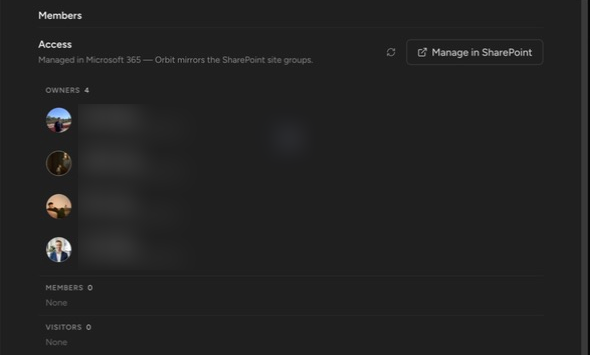
Section titled “Members”The Members section is a read-only mirror of access — Orbit never edits membership.
- On a personal workspace it states the model: Personal OneDrive workspace — Microsoft 365 sharing decides who can access individual notes.
- On a team workspace it shows Managed in Microsoft 365 — Orbit mirrors the SharePoint site groups, with a Manage in SharePoint link and the site’s Owners, Members, and Visitors groups.
Only workspace admins see the detailed roster, and listing it takes a one-time, read-only SharePoint consent: Listing members needs one-time SharePoint read consent. If SharePoint refuses your account access to the site’s membership list, Orbit says so and the Manage in SharePoint link remains your path.
Workspace admin is an Orbit rule, not a SharePoint role: the workspace’s creator and your tenant’s admins are workspace admins. Roles and reach are covered in the permissions model.
Templates
Section titled “Templates”Templates live in the settings modal, not the per-workspace page: open Settings → Templates. Templates are saved per workspace — pick the workspace at the top of the pane, then create and edit its templates. Full guide: Templates.
How do I add someone to the workspace? In SharePoint. Add them to the site’s Members group (or Visitors for read-only) — there is no invite flow in Orbit. See Create a team workspace.
How do I delete a workspace? Workspace admins can Archive workspace (hide it for everyone, keep everything) or Delete Workspace (remove Orbit’s data for everyone) under General above. Either way the SharePoint document library and its files stay where they are — removing the files themselves happens in SharePoint, under your organization’s policy. Unpinning (Switch and find workspaces) removes the workspace from your own list only.
This wraps up Workspaces. Continue with Where your notes live to see exactly what’s stored where.