

Comment on notes and mention people
Attach a discussion to the exact text it is about, and pull the right person in with an @-mention.
Start a comment thread
Section titled “Start a comment thread”- Select the text you want to discuss.
- Click Comment in the formatting toolbar.
- Write your comment — the field reads Add a comment — and click Comment.
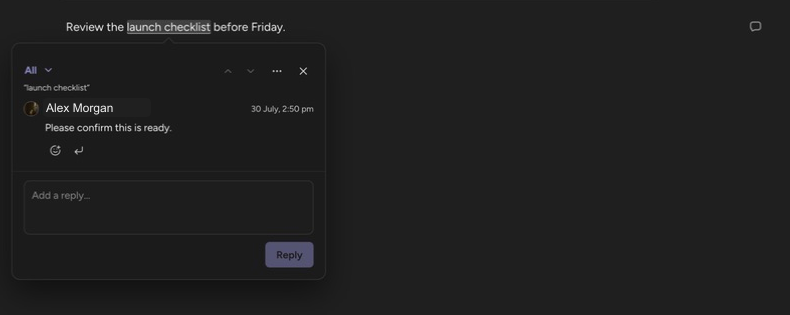
The thread anchors to the selected text and the passage takes a soft blue highlight. Every commented passage also shows a marker in the editor margin (Open comment); click either the highlight or its marker to open the thread, which appears as a card in the note’s right margin, level with the text it belongs to.
Reply, resolve, and delete
Section titled “Reply, resolve, and delete”- Reply in the Add a reply… field. Use Reply on a specific message to answer it directly — the composer shows “Replying to {name}”.
- Click Resolve when the thread is done. A resolved thread leaves the note entirely — its highlight and margin marker both disappear, so the text reads clean. The thread is not lost: open the comments panel and switch its filter to Resolved to find it, then Reopen to bring it back to the note.
- Delete a message or thread with Delete in the thread’s actions menu.
React with emoji
Section titled “React with emoji”Click Add reaction on any message and pick one of eight emoji: 👍 👎 😂 🎉 🤔 ❤️ 🚀 👀. Click the same emoji again to remove your reaction.
See every comment
Section titled “See every comment”Open the note’s ⋯ menu and choose Show all comments to dock the comments panel beside the note. It lists every thread — including resolved ones, which no longer appear in the note itself. Click a row to scroll the note to that passage.
The filter icon in the panel header narrows the list to Open (the default), Resolved, or All. Replies collapse behind a Show N replies toggle, with the most recent reply always visible.
While the panel is open it takes the place of the table of contents, and clicking a highlight selects the thread in the panel rather than opening a margin card. Choose Hide all comments from the same menu to close it. On a phone the panel opens as a bottom sheet instead.
Mention someone
Section titled “Mention someone”Type @ in a comment — or directly in the note body — and start typing a name. Suggestions begin with people already connected to the note: workspace members, share recipients, and previous participants. After two letters, Orbit also searches your Microsoft 365 directory, so you can mention anyone in your organization. Select a person to insert the mention.
The first time you search the directory, Orbit asks for a one-time permission — choose Allow directory search. If your organization requires admin approval for that permission, the prompt says so and offers Copy request link and Email your admin. If your account is not allowed to search the directory at all, Orbit tells you: “Your Microsoft account cannot search the organisation directory. Ask your Microsoft 365 admin to check directory access.” People already connected to the note still appear either way.
A mentioned person gets:
- an in-app notification — “{actor} mentioned you in a comment” or “{actor} mentioned you”, with an Open note action, and
- an email, unless they mentioned themselves.
Neither the notification nor the email includes the note’s title or text. Replies to a thread also notify the other participants in it.
Who can see comments? Everyone who can open the note. Readers see threads; writing a comment, reply, or reaction requires edit access.
Where do I find mentions addressed to me? In the Notifications bell and in the Mentions tab of My Activity — see Track activity and notifications.
Up next: give someone access to a single note with Share a note.