

Link notes with wiki links
Connect notes into a wiki: type [[, pick a note, done — and Orbit keeps the links correct when notes are renamed.
Link to another note
Section titled “Link to another note”- Type
[[anywhere in a note. - The Link to page picker opens — keep typing to search note titles.
- Press Enter to insert (Enter to insert).
The slash menu offers the same thing as Wiki link (“Link to another note”). Hover any wiki link to preview the target note in a popover; click it to open the note.
Embed a note or drawing
Section titled “Embed a note or drawing”Type 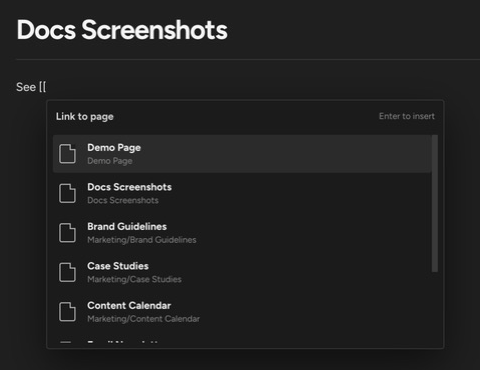
Rename without breaking links
Section titled “Rename without breaking links”When you rename a note, Orbit rewrites every [[link]] pointing at it across the workspace — including in notes other people have open, which update live. A toast confirms the sweep: “Updated N wiki links — References to “{old}” now point to “{new}”.” Rewriting inbound links requires edit access; if any referencing note fails to update, Orbit tells you: “Some wiki links could not be updated”.
Handle unresolved links
Section titled “Handle unresolved links”A wiki link whose target does not exist is unresolved:
- The knowledge sidebar lists them under Unresolved links — see See backlinks and the graph.
- Clicking one shows Linked file not found (“No workspace file matches [[{target}]].”).
- If several files match a link, Orbit shows Multiple files match this link — add a folder path inside the link to disambiguate.
Do wiki links survive outside Orbit?
Yes — they are plain [[target]] text in the markdown file, readable in any editor.
What keeps the link index fresh? Orbit indexes links as you edit. After bulk imports or renames outside Orbit, run Rebuild link index from the command palette (“Rescan workspace notes for wiki links”).
Up next: see what links back to each note in See backlinks and the graph.