

Base documents
A Base document is a live, read-only table over a SharePoint list or document library on your workspace’s site — pick the source once, shape the view, and everyone sees current SharePoint data every time they open it.
Base documents work in team (SharePoint) workspaces. In a personal OneDrive workspace the document shows “This list needs a SharePoint workspace” — move the file into a SharePoint workspace to use it.
Create a Base document
Section titled “Create a Base document”- In a team workspace, choose New in the sidebar, then New list.
- Name it and confirm — Orbit creates a
.basefile. - Pick a source from the picker, grouped into Lists and Document libraries.
The first time, Orbit asks for permission to read your SharePoint sites. Use Change list in the header to point the document at a different source later.
Shape the view
Section titled “Shape the view”The view definition is shared: columns, sort, filters, column order, and widths are saved in the document, so every collaborator sees the same table. Writers can:
- Columns — show or hide columns, drag headers to reorder, drag header edges to resize, Reset to defaults.
- Filter — add clauses per column (text, number, date, and yes/no operators) and match all filters or any filter.
- Sort — click a column header to toggle ascending/descending.
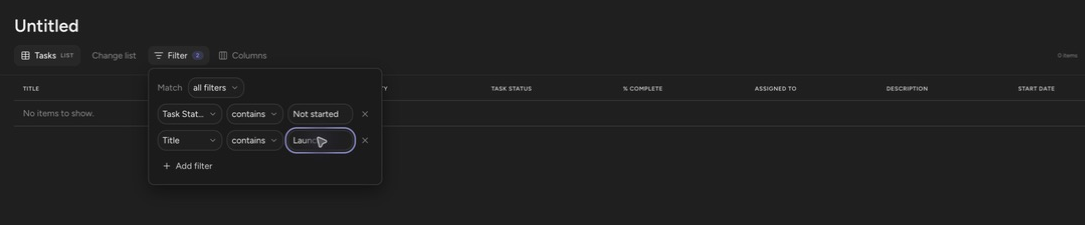
Browse a document library
Section titled “Browse a document library”When the source is a document library, the table browses folder by folder with a breadcrumb. Click a folder row to enter it. The pin button on the breadcrumb sets the default: Pin as default folder makes the document open at that folder for everyone; unpin to open at the library root again.
Files that live in this workspace open in Orbit; files from other libraries open in SharePoint.
Know what’s stored
Section titled “Know what’s stored”Row data is fetched live with each viewer’s own SharePoint permissions and is never stored by Orbit — someone without access to the underlying list sees an error, not your data. Very large sources are capped: the footer reads “Showing the first {count} items — this list has more.” when a view is truncated.
Up next: Templates — start repeated notes from a shared starting point.